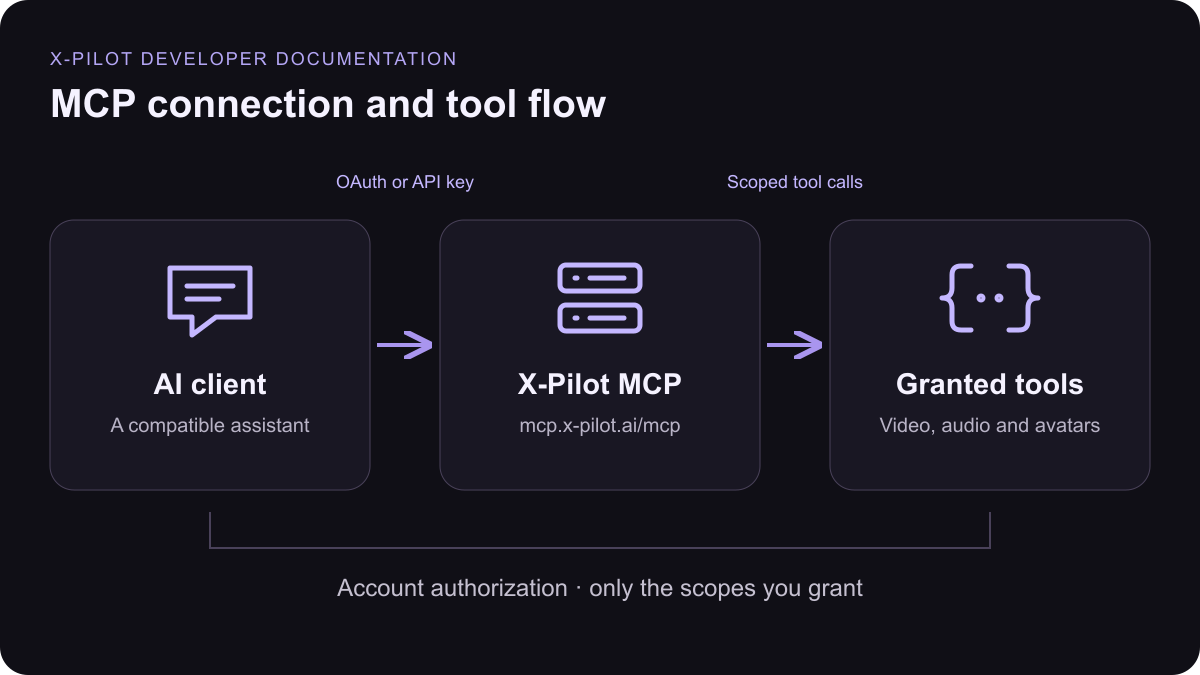
Connect your assistant
1. Open connector settings
In your AI tool, open the MCP or Connectors settings and choose to add a custom (remote) server.2. Paste the MCP URL
Name it X Pilot and paste the URL below. Transport: Streamable HTTP.3. Sign in with OAuth
Click Connect, sign in to X Pilot and approve the requested access. No API key is needed, and you can disconnect at any time from the developer console.4. Start creating
Ask for a video in plain language. Generation uses your existing credits, exactly like the web app.Client setup
Pick your AI tool for the exact place to add X Pilot and how to sign in.- Claude
- Cursor
- Claude Code
- Codex
- VS Code
- Gemini CLI
API key fallback
Use an API Key when a client does not support OAuth, or for CI and servers. Create the key in the developer console and keep it in the XPILOT_API_KEY environment variable — never paste it into a config file or repository. The key’s scopes and monthly budget still apply.Cursor · ~/.cursor/mcp.json
Codex · Terminal
Tool reference
These 31 definitions come from the same tool registry used by the MCP server. Available tools depend on your granted scopes. Upload file bytes through REST assets.check_credits
check_credits
Read the shared wallet balance in credits. Call before paid operations.Scope:
account:readcheck_capacity
check_capacity
Read available concurrency slots and the remaining monthly budget of this credential. Call before create_conversation or send_message.Scope:
account:readlist_conversations
list_conversations
List owned video conversations, newest first. status is one of queued, running, stopping, paused, completed, failed, stopped; next_action tells what a paused conversation needs. Times are Unix seconds.Scope:
video_agents:readget_conversation
get_conversation
Read one conversation summary with status, next_action, cost_credits and preview_video_url. Use list_messages for per-message detail.Scope:
video_agents:readcreate_conversation
create_conversation
Create a video conversation and start the first paid message immediately. Check credits and capacity first. Outline modes: by default (require_outline_confirmation omitted or false) the video is generated straight through without pausing. With require_outline_confirmation=true the message pauses with status=paused and next_action=confirm_outline; show the returned outline to the user, then call send_message with outline_action=confirm (no prompt needed) or outline_action=revise plus a prompt describing the change. Poll list_messages every 5 seconds or more; there is no streaming. Billing matches the app: the platform reserve is held, released at the end, then actual usage is charged (clamped to the balance). cost_credits is the held reserve until the message settles, then the actual charge.Scope:
video_agents:writesend_message
send_message
Send a follow-up turn to a conversation that is not running. Paid. Use it to edit the video, answer the assistant (next_action=reply), or confirm/revise the outline (next_action=confirm_outline). Outline modes: by default (require_outline_confirmation omitted or false) the video is generated straight through without pausing. With require_outline_confirmation=true the message pauses with status=paused and next_action=confirm_outline; show the returned outline to the user, then call send_message with outline_action=confirm (no prompt needed) or outline_action=revise plus a prompt describing the change. video_config cannot be changed here.Scope:
video_agents:writelist_messages
list_messages
List messages of a conversation in order. Poll this for status, next_action, outline (when an outline exists), cost_credits and preview_video_url. completed, paused, failed and stopped are terminal for that message.Scope:
video_agents:readstop_conversation
stop_conversation
Stop the running message. Poll list_messages until it is stopped; cost already incurred may still be charged.Scope:
video_agents:writedelete_conversation
delete_conversation
Delete an owned conversation and stop any running message. Only when the user asks.Scope:
video_agents:writelist_renders
list_renders
List MP4 exports of a conversation. status is queued, running, completed, failed or superseded. progress is a 0–100 percentage when known, otherwise null.Scope:
video_agents:readcreate_render
create_render
Export an MP4 after preview_video_url is available. A preview is not an export. Poll get_render and report its 0–100 progress until completed, then return video_url.Scope:
video_agents:writeget_render
get_render
Read one export: status, progress (0–100 or null when unavailable), and video_url when completed.Scope:
video_agents:readdelete_render
delete_render
Delete an export record. Only when the user asks.Scope:
video_agents:writelist_brand_kits
list_brand_kits
List owned brand kits. Pass an id as video_config.brand_kit_id.Scope:
brand_kits:readget_brand_kit
get_brand_kit
Read one owned brand kit.Scope:
brand_kits:readcreate_brand_kit
create_brand_kit
Create a brand kit for logos, theme colors and tone. Only when the user asks.Scope:
brand_kits:writeupdate_brand_kit
update_brand_kit
Update fields of an owned brand kit. Omitted fields stay unchanged.Scope:
brand_kits:writedelete_brand_kit
delete_brand_kit
Delete an owned brand kit. Only when the user asks.Scope:
brand_kits:writelist_assets
list_assets
List files uploaded to this account, newest first. Upload new files with REST multipart POST /v1/assets (field files, up to 5 files); MCP cannot carry file bytes.Scope:
assets:readlist_avatars
list_avatars
List owned presenter avatars and quota. Only avatars with selectable=true can be used as video_config.avatar_id.Scope:
avatars:readlist_voices
list_voices
Find public catalog voices or your own clones. Choose voice_id from the returned items; never guess provider identifiers. Use samples on list/detail items for fixed audition clips.Scope:
voices:readget_voice
get_voice
Read a public or owned voice, including readiness and samples. Private voices from another account are unavailable. Poll this after clone_voice: a Voice II clone moves from training to trained (selectable=true) or failed.Scope:
voices:readgenerate_audio
generate_audio
Synthesize up to 1,000 characters with a catalog voice or one of your ready clones, in Voice I or Voice II. voice_version must match the voice. Returns MP3 audio_url (which may be a data URL). Uses platform TTS pricing; reuse the same idempotency_key for retries.Scope:
audio:writeget_voice_clone_config
get_voice_clone_config
Read Voice II clone requirements before clone_voice with voice_version 2: availability, the authorized company_name, supported locales with the consent_statement the speaker must read aloud, and sample duration/size limits. When voice_ii_available is false (for example voice_ii_unavailable_reason clone_disabled), do not attempt a Voice II clone; offer Voice I instead.Scope:
voices:readclone_voice
clone_voice
Clone a private voice from audio already uploaded to your account. Voice I (default) is an instant clone from one sample. Voice II needs the speaker’s consent: call get_voice_clone_config, have the speaker record the consent_statement for the chosen locale with their name and company_name filled in, upload it separately, then pass voice_talent_name, locale, consent_audio_url and consent_accepted=true. Never fabricate consent or set consent_accepted without the speaker’s explicit agreement. Voice II returns 403 voice_ii_unavailable while cloning is not open for the account. Poll get_voice until state is trained or failed. Reuse idempotency_key on retry.Scope:
audio:writedelete_voice
delete_voice
Delete an owned cloned voice. Public catalog voices cannot be deleted. Reuse idempotency_key on retry.Scope:
audio:writeget_avatar
get_avatar
Read an owned avatar. status is the overall state (draft, generating, ready, failed, deleting, migration_required); training_status and preview_status track training and the preview sample; selectable must be true before video generation can use it; stage names the step in progress (queued, generating_training_video, provider_processing, generating_preview, deleting_provider_asset) or null when idle; error is {code, message} on failure. Training ready alone does not mean it can be used in a video.Scope:
avatars:readcreate_avatar
create_avatar
Create an avatar from an owned asset_id or a public http(s) image/video URL. Third-party URLs are downloaded and archived to the caller’s owned storage before training. Requires platform entitlement. Poll get_avatar for preview_image_url and preview_video_url, or receive avatar.completed / avatar.failed through callback_url or a webhook subscription. Reuse idempotency_key on retry; never retrain automatically.Scope:
avatars:writedelete_avatar
delete_avatar
Delete an owned avatar. Poll get_avatar or list_avatars until it disappears. Reuse idempotency_key on retry.Scope:
avatars:writecreate_avatar_video
create_avatar_video
Synthesize a talking-presenter video with an owned avatar whose training_status is ready. Drive it with text + voice_id (platform TTS, Voice I or Voice II) or with your own speech audio (asset_id or a public http(s) audio_url) — exactly one source, up to 5 minutes of speech. Output is a transparent-background WebM (VP9 with alpha) for compositing. Billed per rendered second at the digital-human video rate; the balance must cover the estimate before dispatch. Poll get_avatar_video, or receive avatar-video.completed / avatar-video.failed through callback_url or a webhook subscription. Reuse idempotency_key on retry; never resubmit automatically.Scope:
avatars:writeget_avatar_video
get_avatar_video
Read an avatar video job: status (queued, processing, completed, failed), video_url (transparent WebM) once completed, duration_seconds, width, height and the settled cost_credits. Poll at least 5 seconds apart.Scope:
avatars:readAccess and billing
- The sign-in page shows the account and the access being granted. Tokens only work for the X Pilot MCP server; access tokens last one hour and refresh automatically.
- Disconnect a client any time from Developer console → Connected AI. Tasks already running continue.
- MCP uses the same wallet as the web app: credits are reserved when a task starts, released when it ends, and the actual usage is charged. A task never takes your balance below zero.
- The AI sees only the tools allowed by the access you approved. Upload files with REST POST /v1/assets.